
Choosing a plan
How to read a plan card — price, offer, free trial and features — monthly versus yearly billing, and what each plan limit means.
Your plan sets what your store can do: the features it has, limits such as the number of live products and team members, the storage, and the kind of store address. You find the plans in the pricing section on the home page of the sign-up site.
How to read a plan card
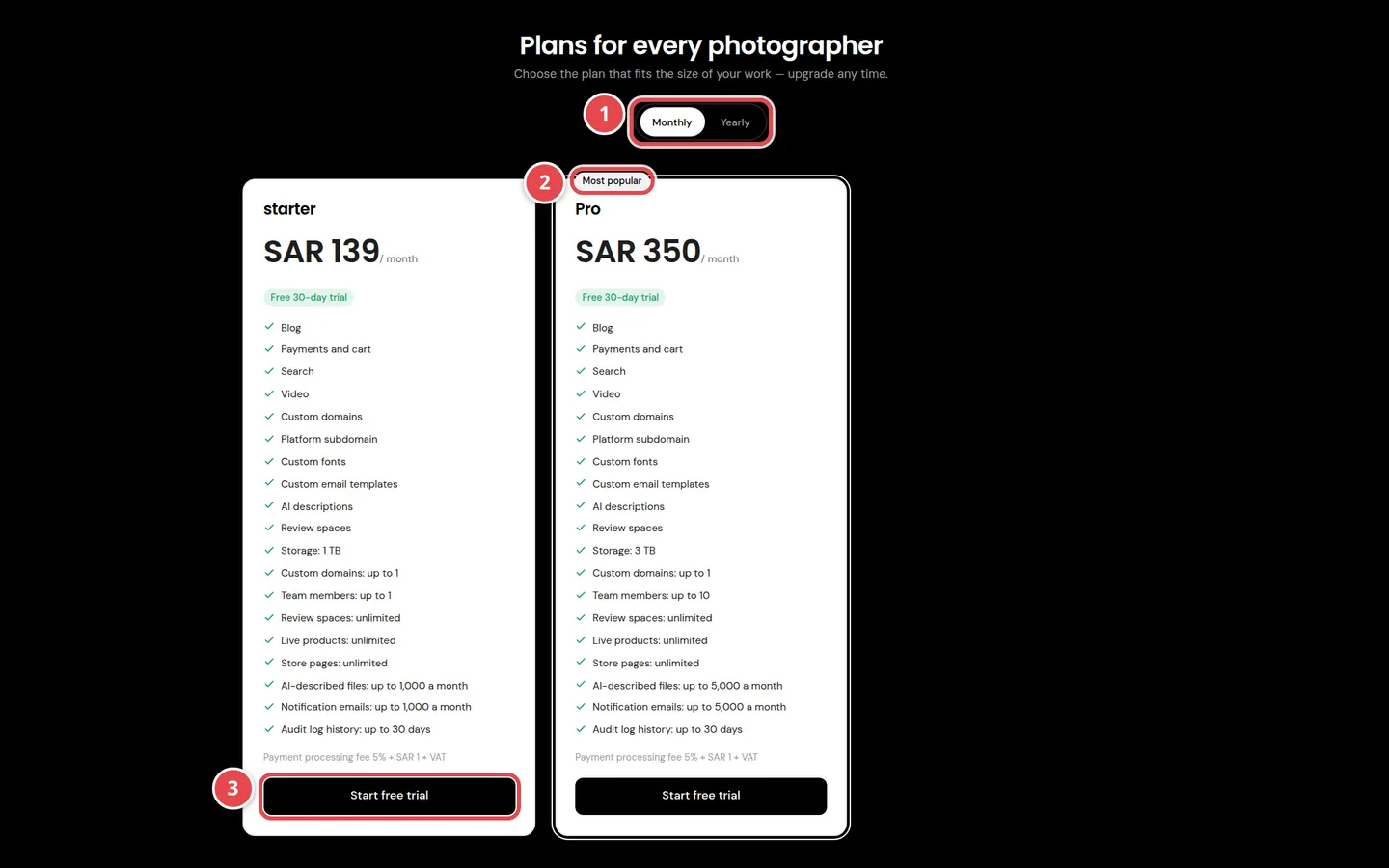
- The Monthly and Yearly buttons: change the prices shown on every card.
- The Most popular badge.
- The card button: starts sign-up on this plan.
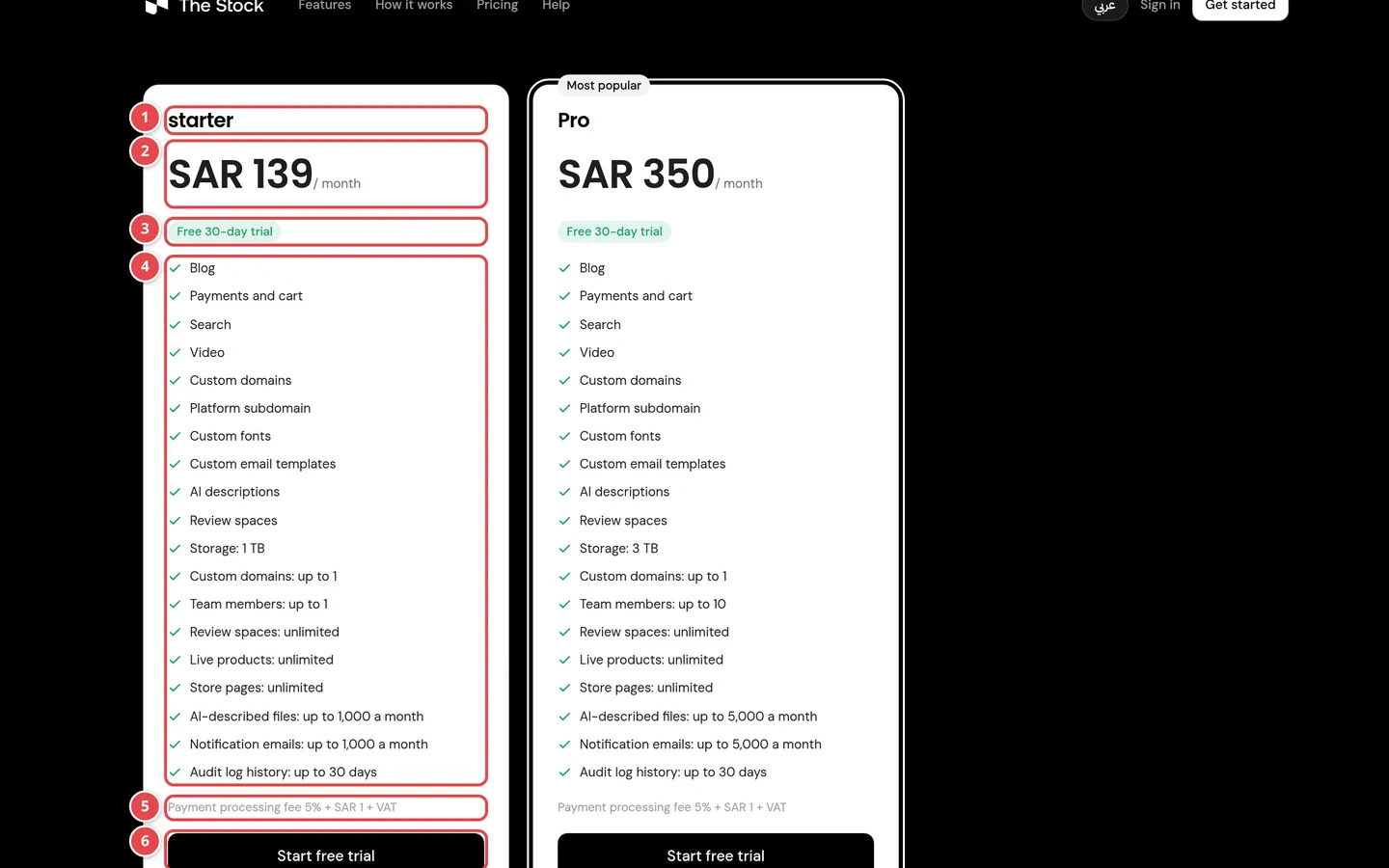
- The plan name.
- The price per month or year. With an offer, the price before the discount is struck through next to it.
- The badges: the offer name or Special offer, and Free trial with its number of days.
- The list of features and limits the plan includes.
- The payment processing fee on your store's sales.
- The Start free trial or Get started button.
Prices on the cards are before VAT. VAT and the total appear on the Payment step of the wizard.
Monthly or yearly
If every plan has a yearly price, Monthly and Yearly buttons appear above the cards. Pick the cycle before you press the plan's button: the wizard takes the cycle that was selected. If you open the wizard directly without going through the pricing section, the cycle is monthly.
You see the cycle you will pay with in the Payment step summary (the Cycle line) before you pay.
Offers and the free trial
Offers
A plan may have an offer for a limited time. The card shows the original price struck through, the price after the discount, and how long the discount lasts:
| What the card shows | What it means |
|---|---|
| First payment only | The discount is on your first payment, then you pay the normal price |
| For the first 2 payments or "For the first N payments" | The discount is on that many first payments |
| For the whole subscription | The discount lasts as long as your subscription does |
| "Until" and a date | The last day you can subscribe with this offer |
The free trial
A Free trial badge means the plan offers a free period of the number of days shown. To start it you verify a payment card: we hold 1 SAR and release it at once, then your store opens with everything in the plan without paying. When the trial ends the plan price is charged to that card automatically, unless you cancel before. The trial is once per company and once per card. If you start a trial on a plan with an offer, the offer is kept for your first payment after the trial.
Payment processing fee
The Payment processing fee line on the card is what the platform takes from each sale made in your store: a percentage of the sale, sometimes plus a fixed amount. If it is followed by + VAT, VAT is charged on the fee itself. The fee is deducted from what you earn from sales; it is not part of the subscription price.
Features: what each line means
A card lists only the features the plan includes. These are all the possible features:
| Feature as shown | What it means |
|---|---|
| Blog | Blog posts on your store |
| Payments and cart | Cart, checkout and subscriptions on your store |
| Search | Product search on your store |
| Video | Video upload and playback |
| Download packages | Sell prepaid download packages to your customers |
| Custom domains | Connect your own domain to the store (like shop.example.com) with SSL |
| Platform subdomain | An address for your store under the platform domain that works at once, no DNS setup |
| Custom fonts | Upload your own font files for your store's brand |
| Custom email templates | Edit the text and design of the emails your store sends |
| AI descriptions | Automatic description, keywords and category for the images and videos you upload |
| Review spaces | Spaces where your team reviews, comments on and approves files |
| Client review links | Share review files with your clients by a link on your store's domain, so they can view, comment and approve without an account |
Limits: what each number means
Limits appear on the card as "Name: up to N" or "unlimited". A monthly limit says a month after the number and starts again at the beginning of each month. The limit of a feature the plan does not include is not shown.
| Limit as shown | What it means |
|---|---|
| Storage | The storage space for your store's files |
| Custom domains | The most own domains you can connect to the store. Your subdomain on the platform does not count |
| Team members | The most team members the store can have, pending invitations and the owner included |
| Review spaces | The most review spaces the store can have, archived ones included |
| Live products | The most products live in your store at once, platform products you switched on there included |
| Store pages | The most content pages your store can have, draft or published |
| AI-described files | The most uploaded files that get an AI description each month |
| Notification emails | The most emails your store sends from its notifications page each month. Sign-in and invoice emails do not count |
| Audit log history | How many days your team's activity log is kept; older entries are deleted daily. "Unlimited" means it is kept forever |
Changing your plan later
You can change your plan at any time from the subscription page in your dashboard. If the new plan does not allow an address type your store uses, we ask you to adjust your domains first. Details in Subscription and billing.
Do the prices include VAT?
No. Prices on the cards are before VAT, and the total with VAT appears on the Payment step.
Why does the wizard show the monthly price when I chose yearly?
The cards on the wizard's Choose your plan step always show the monthly price. The cycle you will pay with is on the Cycle line of the Payment step. For yearly, choose Yearly in the pricing section on the home page, then press the plan's button.
Do I pay the payment processing fee if I sell nothing?
No. The fee is only charged on each sale in your store.
A plan says "Not open for new sign-ups right now". Why?
No kind of store address you can sign up with is available on that plan right now. Choose another plan or come back later.