
Subscription and billing
Subscription states, the next payment, renewing and coupons, your payment card and auto-renew, upgrading and scheduled downgrades, cancelling, the free trial, and the grace period and a stopped store.
The Subscription page is where you manage your store's plan on The Stock: you see its status and paid period, renew, change plan and cancel. The page stays available even when your store is stopped, so you can renew.
Subscription states
The state shows next to Status on the current plan card:
| State | Public store | Dashboard |
|---|---|---|
| Trial | Running during the free trial | Fully working |
| Active | Running until the Paid until date | Fully working |
| Grace period | Keeps running until Grace period ends | Fully working |
| Stopped | Stopped because the subscription was not renewed | Read-only, and Subscription is open for payment |
| Cancelled | Stopped after the period you cancelled ended | Read-only, and Subscription is open for payment |
| Expired | Stopped | Read-only, and Subscription is open for payment |
| Awaiting payment | Not opened yet | Waiting for the first payment to complete |
Your current plan and next payment
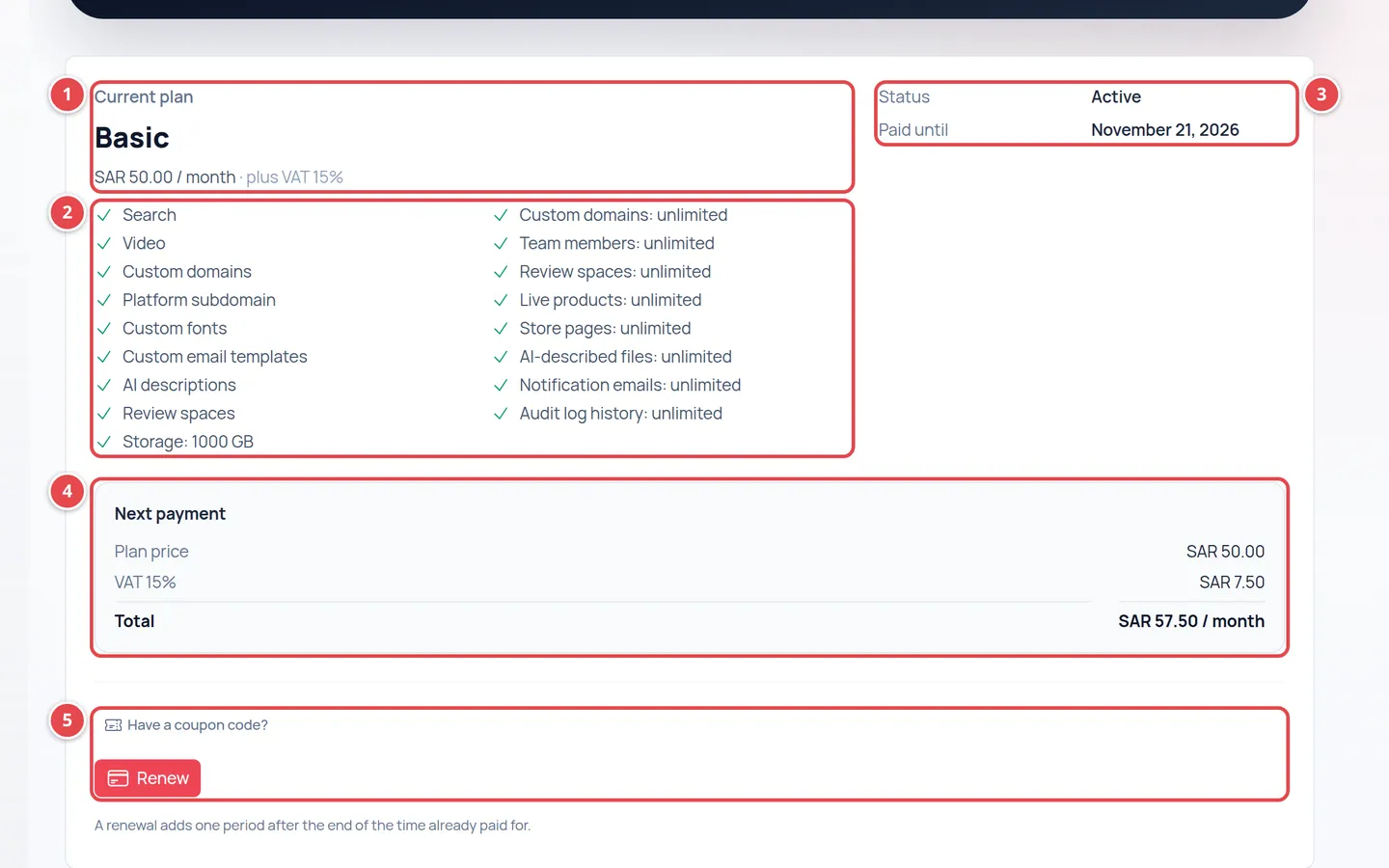
- The plan name and its price per month or year, plus VAT.
- The plan's features.
- Status and Paid until.
- Next payment: Plan price, Discount, VAT and Total.
- The Have a coupon code? field and the Renew button.
Below the card is Usage: what your store uses of its plan limits, such as team members and live products. Near a limit you see Nearly at your plan limit.
Renewing and paying
Add a coupon if you have one
Press Have a coupon code?, enter the code, then Apply. If your plan has a better offer you see The plan offer is better, so it is applied instead of your coupon.
Press Renew
Press Renew (or Pay now when the store is on its trial, in its grace period or stopped), then accept You will be taken to the payment page. Continue?
Pay on the payment page
Enter your card details and complete your bank's check if asked.
Wait for confirmation
When you come back you see Confirming your payment… for a few seconds, then the paid period updates. The payment is listed under Recent payments.
A renewal adds one full period after the end of the time already paid for, so renewing early loses no days. If the store is stopped, it opens again from the payment day for a full period.
Your payment card and auto-renew
We save your card when it is verified for the free trial or when you pay, and charge it automatically when the trial ends and at each renewal. The Payment card box shows only the card type, its last 4 digits and its expiry. Next to it, Auto-renew shows the next charge date, and Next payment shows the date and the amount too.
Change the card
Press Change card (or Add card when no card is saved) and accept the message: we hold 1 SAR on the new card to verify it and release it at once.
Confirm the card on the payment page
Enter the card details and complete your bank's check.
Wait for the check
When you come back you see Verifying your card… for a few seconds, then Your new card is saved with its last 4 digits, and it replaces the previous card. If the card cannot be verified you see Your card could not be verified. Nothing was charged. and a Try again button.
To stop auto-renew, turn off Renew automatically and accept. This is the same as cancelling at the end of the period: nothing is charged, and your store keeps running until the end of the paid period or the trial, then stops. To turn it back on, switch it on again before that date.
If the automatic charge fails
You see We could not charge your card with the date of the next try, the Pay now and Change card buttons, and the Automatic charge attempts list. The store enters its grace period as usual, and we try again 1, 3 and 5 days after the first try. Paying with Pay now stops the remaining tries, and a new card is used at the next try.
If the card is declined for good, for example an expired or lost card, we do not try it again and you see This card was declined and will not be charged again. Add a new card or pay now.
Changing plan
The Other plans card lists the plans on offer. Choose Monthly or Yearly next to a plan, then press Upgrade or Downgrade.
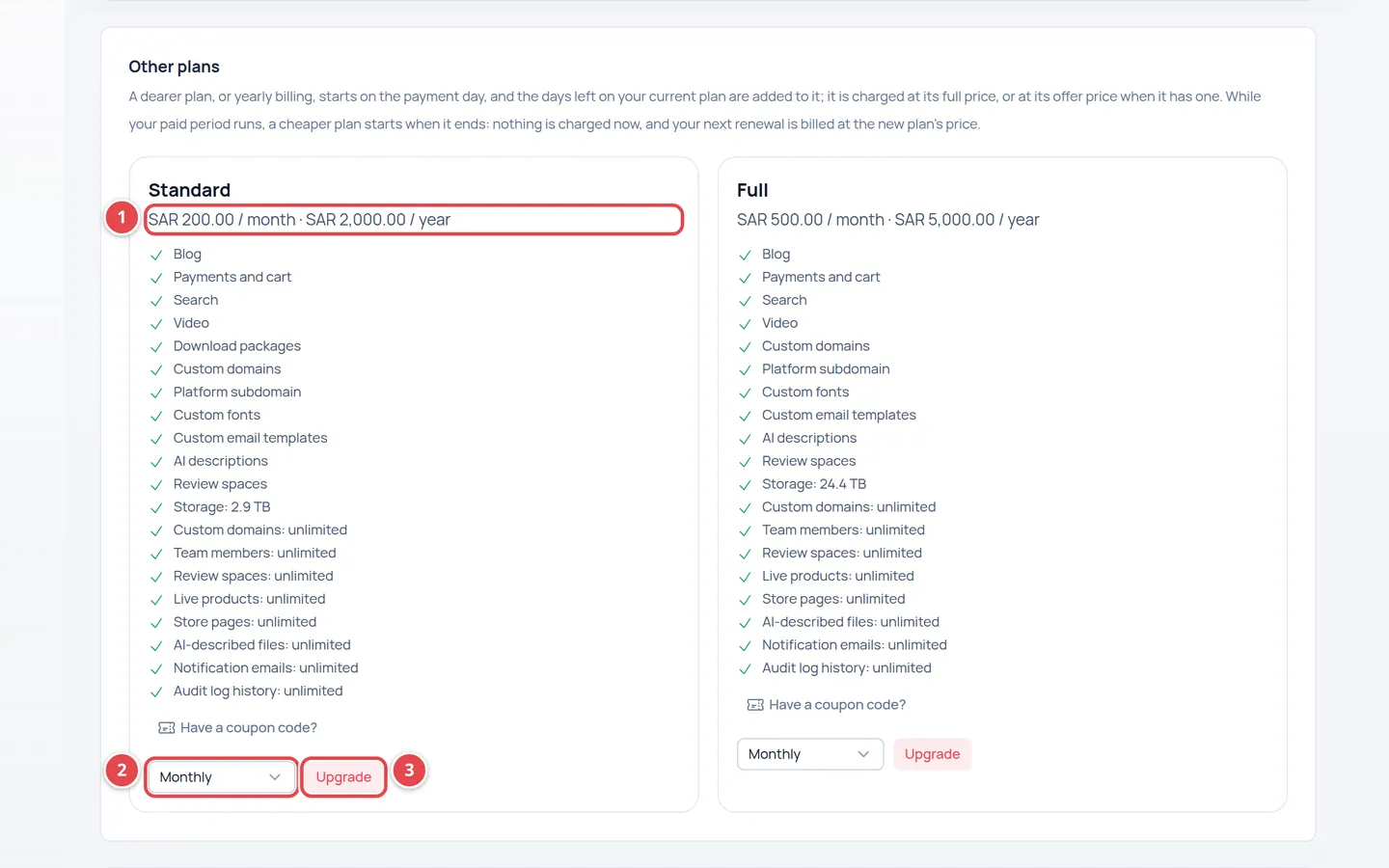
- The price, and the offer price when there is one.
- The Monthly or Yearly picker.
- The Upgrade or Downgrade button, depending on the plan.
Upgrading: starts now
A dearer plan, or moving from monthly to yearly billing, is an Upgrade. You pay now on the payment page, the new plan starts on the payment day, and the days left on your current plan are added to it. You can use a coupon with an upgrade.
Downgrading: scheduled for the end of the period
A cheaper plan or one at the same price, or moving from yearly to monthly, is a Downgrade. While your paid period runs:
Choose the downgrade
Press Downgrade and accept the message: your plan changes on the date your period ends, and nothing is charged now.
Check the scheduled change
Your plan card shows Changing to ... on .... If your store uses more than the new plan allows, you see a list under Your store uses more than the new plan allows:. Nothing is deleted, but you will not be able to add more.
Change your mind if you like
Press Cancel this change to stay on your current plan.
Your next renewal is billed at the new plan's price. Once that renewal is paid, the change can no longer be modified or cancelled. A coupon is not used with a scheduled downgrade, because nothing is paid now.
Changing plan ends your current offer or discount, and the new plan's offer applies if it has one.
If the change is refused because of your domains
Each plan sets which domain types it allows: the platform subdomain and a custom domain. If you choose a plan that does not allow a domain your store uses, the change is refused before anything is charged or scheduled, and a Change the store's domains first box lists the domains.
Go to domains
Press Go to domains.
Make an allowed domain primary
Pick a domain the new plan allows and make it primary, then delete the domains listed.
Change plan again
Go back to Subscription and repeat the change.
Details in Managing your store domains.
Cancelling and withdrawing it
Give a reason
In the Cancel subscription card enter your reason in Why are you cancelling?. The field is required.
Confirm
Press Cancel subscription and accept. Your store keeps running until the end of the paid period, then stops, with no grace period.
Withdraw if you like
Until that date a Cancelled box shows with a Withdraw cancellation button.
The free trial
During the trial a banner shows the days left, along with the Free trial ends date. When the trial ends, we charge the plan price automatically to the card verified at sign-up. You can pay at any time with Pay now.
If you cancel during the trial or turn off auto-renew, nothing is charged and your store stays open until the trial ends, then stops. If the charge at the end of the trial fails, the store moves to Grace period like any subscription whose period ended, and we try again during it.
The grace period and a stopped store
When the paid period ends without a renewal, or the automatic charge fails, the subscription enters its Grace period. Your public store keeps running and selling until the Grace period ends date, and a notice shows on the Subscription page and the store dashboard.
After the grace period the public store stops and the dashboard becomes read-only: you can view and download your content, but not upload or edit. The Subscription page stays available, and after payment the store opens again from that day for a full period.
I paid but the paid period did not change?
Confirmation can take a few seconds after you come back. Wait for Confirming your payment…, then press Refresh. A payment that did not complete shows under Recent payments as Not completed.
Why was my coupon refused?
A message gives the reason, such as This coupon has expired. or This coupon does not apply to this plan.. You can pay without it.
Do I lose my content if the store stops?
No. Your content stays saved and you can view and download it, and the store runs again after payment.
Why did I see a 1 SAR hold on my card?
It verifies the card when you change it or start the trial, and we release it at once, so nothing is charged. Depending on your bank, it may show on your statement for a while.